
Software development is no longer only about writing code.
Modern software teams must plan features, manage code, review pull requests, run automated tests, deploy applications, monitor uptime, secure infrastructure, handle incidents, manage cloud costs, scan vulnerabilities, create containers, automate infrastructure, and deliver updates faster without breaking production.
That is why DevOps tools have become essential for software development teams.
DevOps brings development and operations closer together. Instead of developers throwing code over the wall to operations teams, DevOps encourages shared responsibility for building, testing, deploying, monitoring, and improving software systems.
The right DevOps toolchain helps teams:
- Write and review code faster
- Automate testing
- Build CI/CD pipelines
- Deploy safely
- Manage infrastructure as code
- Run containers
- Orchestrate Kubernetes workloads
- Monitor applications
- Track errors
- Respond to incidents
- Improve software delivery speed
- Reduce manual deployment mistakes
- Improve security and compliance
GitHub Actions is officially described as a continuous integration and continuous delivery platform that allows teams to automate build, test, and deployment pipelines directly from GitHub repositories. Kubernetes is described by its official project site as an open-source system for automating deployment, scaling, and management of containerized applications. Terraform is described by HashiCorp as an infrastructure-as-code tool that lets teams build, change, and version infrastructure safely and efficiently.
This guide compares the best DevOps tools for software development teams, explains how each category fits into the software delivery lifecycle, and helps teams choose the right tools for CI/CD, source control, containers, infrastructure, monitoring, security, collaboration, and incident response.
Important Disclaimer
This article is for general educational and informational purposes only. It is not cybersecurity, software architecture, cloud engineering, legal, compliance, or professional consulting advice. DevOps tool choices depend on team size, technology stack, cloud provider, security requirements, budget, compliance needs, internal skills, and production risk. Always evaluate tools directly before adopting them in production environments.
What Are DevOps Tools?
DevOps tools are software platforms used to automate and manage the software development, delivery, deployment, infrastructure, monitoring, and operations lifecycle.
DevOps tools may cover:
- Source code management
- Git repositories
- Pull requests
- Code review
- CI/CD pipelines
- Automated testing
- Build automation
- Artifact management
- Containerization
- Container registries
- Kubernetes orchestration
- Infrastructure as code
- Configuration management
- Secrets management
- Cloud deployment
- Monitoring
- Logging
- Observability
- Application performance monitoring
- Error tracking
- Security scanning
- Vulnerability management
- Incident response
- On-call alerts
- Collaboration
- Project tracking
- Release management
A complete DevOps system is not one single tool. It is a toolchain that connects planning, code, build, test, deploy, monitor, and improve.
Why Software Development Teams Need DevOps Tools
Without DevOps tools, software delivery becomes slow and risky.
Teams may face problems like:
- Manual deployments
- Broken releases
- Slow testing
- Poor code review process
- No deployment history
- No rollback process
- Infrastructure created manually
- Unknown production issues
- Weak monitoring
- Too many alerts
- No incident ownership
- Security testing too late
- Poor environment consistency
- No audit trail
- Dependency vulnerabilities
- Developer productivity issues
DevOps tools help teams solve these problems through automation and visibility.
A good DevOps toolchain can help a team move from:
Manual, risky, slow releases
to:
Automated, repeatable, monitored, secure releases
For startups, DevOps tools help ship faster. For enterprises, they help standardize governance, security, and reliability at scale.
Main Categories of DevOps Tools
Before comparing tools, it helps to understand the categories.
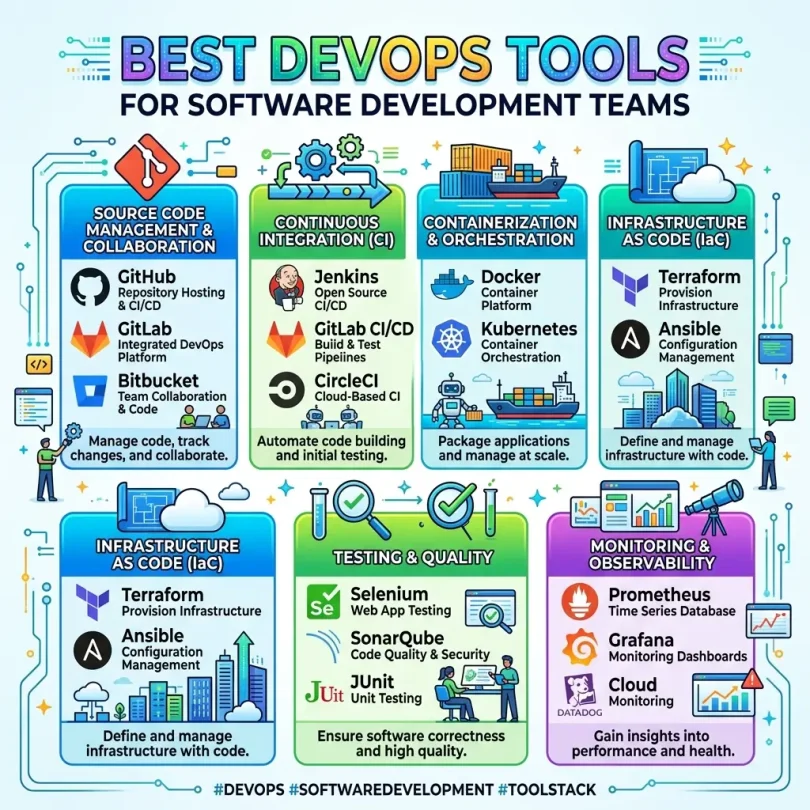
1. Source Code Management
Used for Git repositories, branches, pull requests, and code review.
Examples:
- GitHub
- GitLab
- Bitbucket
2. CI/CD Tools
Used to automate builds, tests, and deployments.
Examples:
- GitHub Actions
- GitLab CI/CD
- Bitbucket Pipelines
- CircleCI
- Jenkins
3. Container Tools
Used to package applications into portable environments.
Examples:
- Docker
- Podman
- containerd
4. Orchestration Tools
Used to run containers at scale.
Examples:
- Kubernetes
- Amazon EKS
- Google Kubernetes Engine
- Azure Kubernetes Service
5. Infrastructure as Code
Used to define cloud and infrastructure resources in code.
Examples:
- Terraform
- Pulumi
- AWS CloudFormation
- Ansible
6. Monitoring and Observability
Used to monitor performance, logs, metrics, traces, and system health.
Examples:
- Datadog
- New Relic
- Prometheus
- Grafana
- Elastic Observability
7. Security Tools
Used to scan dependencies, containers, code, secrets, and cloud configurations.
Examples:
- Snyk
- GitHub Advanced Security
- GitLab security scanning
- Aqua Security
- Wiz
8. Incident Response
Used for on-call alerts and incident management.
Examples:
- PagerDuty
- Opsgenie
- incident.io
- FireHydrant
9. Collaboration and Project Tracking
Used to manage tasks, sprints, issues, and team workflows.
Examples:
- Jira
- Linear
- Asana
- Trello
Best DevOps Tools for Software Development Teams
Below are some of the best DevOps tools to compare in 2026.
1. GitHub
Best for: Source control, collaboration, pull requests, CI/CD, and developer ecosystem
Good for: Startups, open-source projects, SaaS teams, enterprise development teams
Main strength: Code hosting plus automation, AI, security, and collaboration
GitHub is one of the most widely used platforms for source code hosting and developer collaboration. It supports Git repositories, pull requests, issues, discussions, project boards, code review, GitHub Actions, security scanning, packages, and AI-assisted development through GitHub Copilot.
GitHub says its platform helps developers build and ship better software faster from the first line of code to final deployment, with AI and automation tools across the workflow. GitHub Actions documentation says teams can automate, customize, and execute software development workflows directly inside a repository.
Key Features
- Git repositories
- Pull requests
- Code review
- Issues
- Projects
- GitHub Actions
- CI/CD workflows
- GitHub Packages
- Dependabot
- Code scanning
- Secret scanning
- GitHub Copilot
- Branch protection rules
- Collaboration tools
- Open-source ecosystem
- Enterprise controls
Why GitHub Is Good
GitHub is strong because developers already know it. This improves adoption.
For many teams, GitHub becomes the center of the DevOps workflow:
- Code lives in GitHub
- Pull requests manage review
- GitHub Actions runs CI/CD
- Dependabot checks dependencies
- Code scanning finds vulnerabilities
- Issues track work
- Projects organize roadmap
- Copilot supports developers
GitHub is especially strong for teams that want source control, CI/CD, security checks, and AI-assisted coding in one familiar environment.
Best Fit
GitHub is best for software teams that want a popular developer platform with strong ecosystem support, integrated CI/CD, and modern collaboration features.
Possible Downsides
Complex enterprise governance may require GitHub Enterprise features. CI/CD costs and workflow maintenance should be monitored as projects scale.
2. GitLab
Best for: All-in-one DevSecOps platform
Good for: Teams wanting source control, CI/CD, security, compliance, and deployment in one platform
Main strength: Integrated DevSecOps lifecycle
GitLab is a DevSecOps platform that combines source code management, CI/CD, security scanning, project management, package registry, deployment workflows, and compliance features.
GitLab describes DevSecOps tools as tools that automate security workflows, improve collaboration between development and security teams, break down silos, and protect applications throughout development and live production. GitLab also highlights ongoing platform updates including CI/CD secrets management and workflow automation improvements.
Key Features
- Git repositories
- Merge requests
- CI/CD pipelines
- Security scanning
- Dependency scanning
- Container scanning
- Secret detection
- Compliance features
- Package registry
- Issue tracking
- Roadmaps
- Release management
- Kubernetes integration
- DevSecOps workflows
- Self-managed and cloud options
Why GitLab Is Good
GitLab is strong for teams that want fewer separate tools. Instead of buying one tool for code, another for CI/CD, another for security, and another for releases, GitLab brings many of these capabilities into one platform.
This is useful for companies that want standardization, governance, auditability, and built-in DevSecOps.
Best Fit
GitLab is best for companies that want an integrated DevSecOps platform with strong CI/CD and security workflows.
Possible Downsides
Teams already deeply invested in GitHub may prefer GitHub plus specialized tools. GitLab can be powerful, but teams should configure only the features they actually need.
3. Bitbucket
Best for: Teams using Atlassian tools
Good for: Jira users, Confluence users, small engineering teams, enterprise Atlassian environments
Main strength: Git code hosting integrated with Jira and Atlassian workflow
Bitbucket is Atlassian’s Git repository and CI/CD platform. It is especially useful for teams already using Jira, Confluence, and other Atlassian products.
Bitbucket Pipelines provides CI/CD inside Bitbucket. Atlassian says Bitbucket Pipelines can dynamically modify workflows at runtime based on custom logic and enforce company-wide policies, rules, and processes as code across repositories.
Key Features
- Git repositories
- Pull requests
- Branch permissions
- Jira integration
- Confluence integration
- Bitbucket Pipelines
- CI/CD workflows
- Deployment tracking
- Code insights
- Security integrations
- Atlassian ecosystem
- Governance features
Why Bitbucket Is Good
Bitbucket is strong for teams where Jira is already the main project management tool. Developers can connect commits, branches, pull requests, builds, and deployments directly to Jira issues.
This creates a clear link between code and work tracking.
Best Fit
Bitbucket is best for software teams already using Jira and Atlassian products.
Possible Downsides
GitHub has a larger developer ecosystem, and GitLab has a stronger all-in-one DevSecOps platform. Bitbucket is most compelling when the team is already invested in Atlassian.
4. GitHub Actions
Best for: CI/CD directly inside GitHub repositories
Good for: GitHub users, startups, open-source projects, SaaS teams
Main strength: Native CI/CD for GitHub workflows
GitHub Actions is GitHub’s CI/CD and workflow automation platform. It allows teams to automate builds, tests, deployments, security checks, code quality checks, release processes, and repository workflows.
GitHub’s quickstart documentation says GitHub Actions is a CI/CD platform that lets teams automate build, test, and deployment pipelines.
Key Features
- CI/CD workflows
- YAML-based pipelines
- Build automation
- Test automation
- Deployment automation
- Matrix builds
- Marketplace actions
- Self-hosted runners
- GitHub integration
- Secrets management
- Pull request checks
- Release automation
- Security workflow automation
Why GitHub Actions Is Good
GitHub Actions is convenient because it lives inside GitHub. Developers can trigger workflows from commits, pull requests, releases, issue events, schedules, or manual dispatches.
Common workflows include:
- Run tests on pull requests
- Build Docker images
- Deploy to Vercel, AWS, Azure, or Google Cloud
- Run linting
- Scan dependencies
- Publish packages
- Create release notes
- Run scheduled jobs
Best Fit
GitHub Actions is best for teams already using GitHub and wanting integrated CI/CD without maintaining a separate CI server.
Possible Downsides
Large or complex workflows can become hard to maintain. Recent empirical research on GitHub Actions found that larger and more complex workflows are associated with higher failure rates and more maintenance effort, highlighting the need for good workflow design and tooling.
5. GitLab CI/CD
Best for: Integrated CI/CD with DevSecOps workflows
Good for: GitLab users, security-focused teams, regulated software teams
Main strength: CI/CD plus security and compliance in one platform
GitLab CI/CD is built into GitLab and helps teams automate build, test, security scanning, deployment, and release workflows.
Because GitLab includes security scanning and compliance features, GitLab CI/CD is useful for teams that want security integrated into the development process.
Key Features
- CI/CD pipelines
- Build automation
- Test automation
- Security scans
- Dependency scanning
- Container scanning
- Secret detection
- Review apps
- Environment management
- Deployment tracking
- Release automation
- Pipeline templates
- Runners
- Compliance controls
Why GitLab CI/CD Is Good
GitLab CI/CD is strong because it is part of the broader GitLab DevSecOps platform. Teams can connect merge requests, issues, pipelines, security findings, deployments, and compliance workflows in one system.
This is especially useful for companies that want security scanning earlier in the development lifecycle.
Best Fit
GitLab CI/CD is best for teams using GitLab as their main development platform.
Possible Downsides
Teams using GitHub may prefer GitHub Actions, CircleCI, or Buildkite instead.
6. Jenkins
Best for: Highly customizable CI/CD and legacy enterprise pipelines
Good for: Enterprises, self-hosted environments, teams with custom build requirements
Main strength: Flexibility, plugin ecosystem, and long history
Jenkins is one of the oldest and most flexible CI/CD tools. It is open source and widely used in enterprise environments.
Jenkins can build almost anything if configured properly. It supports many plugins, custom pipelines, self-hosted execution, and integration with many build tools.
Key Features
- Open-source CI/CD
- Pipeline as code
- Plugin ecosystem
- Self-hosted control
- Build automation
- Test automation
- Deployment automation
- Custom workflows
- Distributed builds
- Integration with many tools
- Enterprise legacy support
Why Jenkins Is Good
Jenkins is powerful when a team needs maximum control. Many enterprises use Jenkins for complex pipelines, legacy systems, private infrastructure, and custom build logic.
It can be cheaper in licensing cost, but it requires more maintenance.
Best Fit
Jenkins is best for teams with experienced DevOps engineers who need deep customization and self-hosted CI/CD.
Possible Downsides
Jenkins requires maintenance, plugin management, security updates, and operational ownership. Newer teams may prefer GitHub Actions, GitLab CI/CD, CircleCI, or Buildkite.
7. CircleCI
Best for: Fast cloud CI/CD pipelines
Good for: SaaS teams, startups, mobile teams, cloud-native teams
Main strength: Developer-friendly CI/CD and performance
CircleCI is a CI/CD platform focused on fast builds, test automation, and deployment workflows.
It is often used by SaaS teams that want a dedicated CI/CD platform separate from code hosting.
Key Features
- Cloud CI/CD
- Build automation
- Test automation
- Deployment pipelines
- Docker support
- Caching
- Parallelism
- Orbs
- Self-hosted runners
- GitHub and Bitbucket integration
- Workflow automation
- Mobile build support
Why CircleCI Is Good
CircleCI is strong when teams care about pipeline speed, caching, parallel testing, and CI/CD performance. It can reduce build times and improve developer feedback loops.
Best Fit
CircleCI is best for teams that want a dedicated CI/CD platform with strong build performance and flexible workflows.
Possible Downsides
Teams already using GitHub Actions or GitLab CI/CD may not need a separate CI/CD platform unless performance or workflow complexity demands it.
8. Docker
Best for: Containerizing applications and development environments
Good for: Developers, DevOps teams, microservices, local development, deployment packaging
Main strength: Build, share, and run container applications
Docker is one of the most important DevOps tools because it helps teams package applications and dependencies into containers.
Docker describes itself as a platform that helps developers build, share, and run container applications, handling setup so developers can focus on code.
Key Features
- Container development
- Dockerfiles
- Docker Compose
- Docker Desktop
- Container images
- Image registries
- Local development environments
- Portable app packaging
- Microservices support
- CI/CD integration
- Development environment consistency
Why Docker Is Good
Docker solves a common developer problem:
“It works on my machine.”
With containers, teams can package application dependencies and run the same environment locally, in CI/CD, and in production.
Docker is useful for:
- Local development
- Microservices
- Testing environments
- Build pipelines
- Application packaging
- Container deployment
- Developer onboarding
Best Fit
Docker is best for teams that want consistent development environments and portable application packaging.
Possible Downsides
Docker is not a full production orchestration platform by itself. For large-scale container production, teams usually need Kubernetes, ECS, Nomad, or another orchestrator.
9. Kubernetes
Best for: Container orchestration at scale
Good for: SaaS platforms, cloud-native apps, microservices, enterprise infrastructure
Main strength: Automating deployment, scaling, and management of containers
Kubernetes is the leading open-source container orchestration platform. It helps teams deploy, scale, and manage containerized applications.
The official Kubernetes site describes it as a production-grade open-source system for automating deployment, scaling, and management of containerized applications.
Key Features
- Container orchestration
- Automated deployment
- Scaling
- Service discovery
- Load balancing
- Self-healing
- Rolling updates
- Secrets and config management
- Kubernetes namespaces
- Ingress
- Helm ecosystem
- Cloud-managed Kubernetes support
- Multi-cloud portability
Why Kubernetes Is Good
Kubernetes is powerful for teams running many containers or microservices. It helps manage deployment, scaling, networking, service discovery, and recovery.
Common managed Kubernetes services include:
- Amazon EKS
- Google Kubernetes Engine
- Azure Kubernetes Service
- DigitalOcean Kubernetes
Best Fit
Kubernetes is best for cloud-native teams running containerized applications at scale.
Possible Downsides
Kubernetes adds complexity. Smaller teams may be better served by simpler platforms like Docker Compose, Render, Railway, Fly.io, Heroku, AWS ECS, or managed platform-as-a-service tools.
10. Terraform
Best for: Infrastructure as code across cloud providers
Good for: Cloud teams, DevOps engineers, platform teams, multi-cloud infrastructure
Main strength: Declarative infrastructure provisioning and version control
Terraform is one of the most widely used infrastructure-as-code tools. It allows teams to define cloud infrastructure using configuration files and manage infrastructure changes through version control.
HashiCorp says Terraform provides a single workflow to provision cloud, private datacenter, and SaaS infrastructure and continuously manage it throughout its lifecycle. HashiCorp’s developer documentation says Terraform lets teams build, change, and version infrastructure safely and efficiently.
Key Features
- Infrastructure as code
- Declarative configuration
- Multi-cloud support
- Providers
- Modules
- State management
- Plan and apply workflow
- Version-controlled infrastructure
- Drift detection support
- HCP Terraform options
- Policy and governance options
- Collaboration workflows
Why Terraform Is Good
Terraform helps prevent manual cloud console mistakes. Instead of clicking infrastructure into existence, teams define it in code.
This provides:
- Reviewable infrastructure changes
- Repeatable environments
- Better audit trail
- Reusable modules
- Multi-cloud consistency
- Safer change planning
- Collaboration between DevOps and developers
Best Fit
Terraform is best for teams managing AWS, Azure, Google Cloud, Kubernetes, networking, SaaS tools, and infrastructure at scale.
Possible Downsides
Terraform state must be managed carefully. Teams need good module structure, remote state, permissions, reviews, and security practices.
11. Ansible
Best for: Configuration management and automation
Good for: Server management, software installation, IT automation, hybrid environments
Main strength: Agentless automation and configuration management
Ansible is an automation tool used for configuration management, server setup, application deployment, and IT automation.
It is especially useful for managing servers and repeatable configuration tasks.
Key Features
- Configuration management
- YAML playbooks
- Agentless automation
- Server provisioning
- Application deployment
- IT automation
- Cloud automation
- Network automation
- Security automation
- Repeatable operations tasks
Why Ansible Is Good
Ansible is useful when teams need to automate server configuration and operational tasks.
Example use cases:
- Install packages
- Configure Nginx
- Manage users
- Deploy applications
- Restart services
- Harden servers
- Update configurations
- Automate patching tasks
Best Fit
Ansible is best for teams managing servers, hybrid environments, or repeatable operational tasks.
Possible Downsides
For cloud resource provisioning, Terraform is often preferred. For application orchestration, Kubernetes may be better. Ansible is strongest in configuration and task automation.
12. Datadog
Best for: Observability, monitoring, logs, traces, and cloud operations
Good for: SaaS teams, SRE teams, cloud-native companies, DevOps monitoring
Main strength: Unified monitoring and security platform
Datadog is a cloud monitoring and observability platform used by DevOps, SRE, security, and engineering teams.
Datadog describes itself as an integrated platform for monitoring and security across observability, security, digital experience, software delivery, service management, AI, and platform capabilities. Reuters reported in February 2026 that Datadog beat quarterly estimates due to stronger demand for cloud security products, with revenue rising 29% year over year to $953.2 million, showing strong market demand for monitoring and cloud security platforms.
Key Features
- Infrastructure monitoring
- Application performance monitoring
- Logs
- Distributed tracing
- Real user monitoring
- Synthetic monitoring
- Cloud monitoring
- Kubernetes monitoring
- Database monitoring
- Security monitoring
- Alerts
- Dashboards
- Incident management features
- DevOps and SRE workflows
Why Datadog Is Good
Datadog is strong because it gives teams visibility across many systems in one platform. When production has a problem, teams need to see metrics, logs, traces, infrastructure, user experience, and security signals together.
Datadog is especially useful for modern cloud systems where applications run across many services, containers, APIs, databases, queues, and cloud infrastructure.
Best Fit
Datadog is best for cloud-native teams that need unified observability and monitoring.
Possible Downsides
Datadog can become expensive as data volume grows. Teams should manage log volume, retention, monitors, custom metrics, and product usage carefully.
13. Prometheus and Grafana
Best for: Open-source monitoring and dashboards
Good for: Kubernetes teams, platform teams, cost-conscious DevOps teams
Main strength: Metrics monitoring plus flexible visualization
Prometheus and Grafana are widely used together for open-source monitoring.
Prometheus collects and stores time-series metrics. Grafana visualizes metrics through dashboards.
Key Features
- Metrics collection
- Time-series monitoring
- Alerting
- Kubernetes monitoring
- Service monitoring
- Open-source ecosystem
- Custom dashboards
- Grafana visualization
- PromQL queries
- Integrations
- Self-hosted control
Why Prometheus and Grafana Are Good
This combination is especially strong for Kubernetes and cloud-native teams. Many DevOps engineers prefer Prometheus and Grafana because they are flexible, open source, and widely supported.
They can monitor:
- CPU
- Memory
- Disk
- Network
- Kubernetes clusters
- Application metrics
- Service health
- Database metrics
- Custom business metrics
Best Fit
Prometheus and Grafana are best for teams that want open-source monitoring and have the skills to operate it.
Possible Downsides
Self-hosted monitoring requires maintenance. Managed observability platforms like Datadog, New Relic, or Grafana Cloud may be easier for smaller teams.
14. Snyk
Best for: Developer-first security scanning
Good for: DevSecOps teams, developers, open-source dependency security, container security
Main strength: Finding and fixing vulnerabilities early in development
Snyk is a developer security platform focused on finding vulnerabilities in open-source dependencies, containers, code, and infrastructure as code.
Key Features
- Open-source dependency scanning
- Container scanning
- Code security
- Infrastructure-as-code scanning
- License compliance
- Pull request checks
- Developer workflow integration
- Fix suggestions
- CI/CD integration
- Security reporting
- IDE integrations
Why Snyk Is Good
Snyk is useful because it brings security closer to developers. Instead of waiting until production, teams can find and fix vulnerabilities during coding and pull requests.
This supports DevSecOps: security becomes part of the development workflow.
Best Fit
Snyk is best for teams that want developer-friendly security scanning across code, dependencies, containers, and infrastructure as code.
Possible Downsides
Snyk findings need triage. Teams should avoid alert fatigue by prioritizing exploitable and high-risk issues.
15. PagerDuty
Best for: Incident response and on-call management
Good for: SRE teams, DevOps teams, 24/7 platforms, mission-critical services
Main strength: Incident management from detection to resolution
PagerDuty is a digital operations and incident response platform. It helps teams route alerts, manage on-call schedules, coordinate response, and improve incident resolution.
PagerDuty said in June 2026 that its Operations Cloud is an AI-powered platform that automates and orchestrates the incident management lifecycle from detection to resolution, helping teams identify, diagnose, mobilize, and streamline workflows before digital issues become bigger incidents.
Key Features
- On-call scheduling
- Alert routing
- Incident response
- Escalation policies
- Service ownership
- Incident automation
- Status updates
- Integrations with monitoring tools
- Post-incident reviews
- AI-powered operations features
- Runbook automation
- SRE workflows
Why PagerDuty Is Good
Monitoring tools detect problems. PagerDuty helps teams respond.
For production systems, alerts need owners. PagerDuty helps make sure the right person is notified at the right time, escalations happen when needed, and incidents are tracked properly.
Best Fit
PagerDuty is best for teams running production systems that require reliable incident response and on-call workflows.
Possible Downsides
PagerDuty can create alert fatigue if monitors are poorly configured. Teams must tune alerts and define escalation policies carefully.
Quick Comparison Table
| DevOps Tool | Best For | Main Strength | Best Team Type |
|---|---|---|---|
| GitHub | Code collaboration | Repos, PRs, Actions, ecosystem | Startups/open source/SaaS |
| GitLab | All-in-one DevSecOps | Source, CI/CD, security, compliance | Integrated platform teams |
| Bitbucket | Atlassian users | Jira-connected code workflow | Jira-heavy teams |
| GitHub Actions | GitHub CI/CD | Native build/test/deploy automation | GitHub teams |
| GitLab CI/CD | DevSecOps pipelines | CI/CD plus security scans | GitLab teams |
| Jenkins | Custom CI/CD | Plugin ecosystem and self-hosting | Enterprise/legacy teams |
| CircleCI | Fast CI/CD | Performance and parallelism | SaaS teams |
| Docker | Containers | Build, share, run containers | All dev teams |
| Kubernetes | Orchestration | Scale containerized apps | Cloud-native teams |
| Terraform | Infrastructure as code | Provision cloud resources safely | DevOps/platform teams |
| Ansible | Configuration automation | Agentless server automation | IT/ops teams |
| Datadog | Observability | Logs, metrics, traces, alerts | Cloud/SRE teams |
| Prometheus + Grafana | Open-source monitoring | Metrics and dashboards | Kubernetes teams |
| Snyk | DevSecOps security | Dependency/code/container scanning | Developer security teams |
| PagerDuty | Incident response | On-call and escalation workflows | SRE/production teams |
Best DevOps Tools by Use Case
Best Source Code Platform
GitHub, GitLab, Bitbucket
GitHub is best for ecosystem and developer adoption. GitLab is best for integrated DevSecOps. Bitbucket is best for Atlassian teams.
Best CI/CD Tool
GitHub Actions, GitLab CI/CD, CircleCI, Jenkins
GitHub Actions is great for GitHub users. GitLab CI/CD is great for GitLab users. CircleCI is strong for fast builds. Jenkins is best for custom self-hosted pipelines.
Best Container Tool
Docker
Docker remains one of the easiest ways to package, share, and run container applications.
Best Container Orchestration Tool
Kubernetes
Kubernetes is the standard for automating deployment, scaling, and management of containerized applications.
Best Infrastructure as Code Tool
Terraform
Terraform is one of the strongest IaC tools for managing cloud, datacenter, and SaaS infrastructure through code.
Best Monitoring Tool
Datadog or Prometheus + Grafana
Datadog is easier as a managed platform. Prometheus and Grafana are strong open-source options.
Best DevSecOps Tool
Snyk, GitHub Advanced Security, GitLab Security
These help developers catch vulnerabilities earlier.
Best Incident Response Tool
PagerDuty
Best for on-call scheduling, alert routing, escalation, and incident lifecycle management.
DevOps Toolchain Example for a Startup
A practical startup DevOps stack may look like this:
- Source code: GitHub
- CI/CD: GitHub Actions
- Containers: Docker
- Hosting: AWS, Google Cloud, Azure, Vercel, Render, or Fly.io
- Infrastructure as code: Terraform
- Monitoring: Datadog or Grafana Cloud
- Error tracking: Sentry
- Security scanning: Snyk or GitHub security features
- Incident response: PagerDuty or incident.io
- Project tracking: Linear or Jira
- Secrets: 1Password, Doppler, or cloud secret manager
This is enough for many early SaaS teams.
DevOps Toolchain Example for Enterprise Teams
A larger company may use:
- Source code: GitHub Enterprise or GitLab
- CI/CD: GitLab CI/CD, GitHub Actions, Jenkins, or CircleCI
- Containers: Docker
- Orchestration: Kubernetes
- IaC: Terraform
- Configuration: Ansible
- Observability: Datadog, New Relic, Elastic, or Grafana
- Security: Snyk, Wiz, GitHub Advanced Security, GitLab security scanning
- Secrets: HashiCorp Vault or cloud secret managers
- Incident response: PagerDuty
- ITSM: ServiceNow
- Project tracking: Jira
- Artifact registry: JFrog Artifactory or GitHub Packages
Enterprise teams usually need stronger governance, security, audit logs, compliance, and standardization.
Key Features to Look for in DevOps Tools
1. Integration With Your Existing Stack
Choose tools that work with your code host, cloud provider, ticketing system, security tools, and communication platform.
2. Automation
Good DevOps tools should reduce manual work.
Look for automation in:
- Builds
- Tests
- Deployments
- Infrastructure changes
- Security scans
- Rollbacks
- Alerts
- Incident response
3. Security Features
Security should be built into the workflow.
Look for:
- Secret scanning
- Dependency scanning
- Container scanning
- IaC scanning
- Code scanning
- Access control
- Audit logs
- Branch protection
- Signed commits
- Policy enforcement
4. Scalability
A tool that works for 3 developers may not work for 300.
Consider growth.
5. Developer Experience
If developers hate a tool, adoption will suffer.
6. Reliability
CI/CD, monitoring, and incident tools must be reliable because teams depend on them during production issues.
7. Governance
Larger teams need:
- Permissions
- Policies
- Audit logs
- Approval workflows
- Environment controls
- Compliance reports
8. Cost Control
DevOps tools can become expensive through:
- CI minutes
- Build runners
- Logs
- Metrics
- Traces
- Seats
- Storage
- Cloud usage
- Add-ons
9. Support for AI Workflows
AI coding assistants and agentic development are becoming more common. Teams should add safeguards in CI/CD pipelines, because AI-generated pull requests can increase workflow demands and require strong testing and review.
10. Observability
Teams need visibility into production health, not only deployment success.
DevOps Pricing: What Teams Should Expect
DevOps pricing depends on:
- Number of users
- Number of repositories
- CI/CD minutes
- Build runners
- Storage
- Security features
- Enterprise plans
- Self-hosted vs cloud
- Log volume
- Metrics volume
- Trace volume
- Kubernetes clusters
- Incident response users
- On-call schedules
- Support level
- Compliance requirements
A cheap tool can become expensive if it creates maintenance burden. An expensive tool can be worth it if it reduces downtime, improves developer speed, and prevents incidents.
Always compare total cost:
- License cost
- Engineering maintenance time
- Cloud compute cost
- Security risk reduction
- Incident reduction
- Deployment speed
- Developer productivity
DevOps Implementation Checklist
Use this checklist when building a DevOps toolchain.
Step 1: Choose Source Control
Pick GitHub, GitLab, or Bitbucket.
Step 2: Standardize Branching
Use simple branch rules, pull requests, and review requirements.
Step 3: Add CI/CD
Automate tests, builds, and deployments.
Step 4: Add Security Scans
Start with secret scanning, dependency scanning, and code scanning.
Step 5: Containerize Carefully
Use Docker where it improves consistency.
Step 6: Add Infrastructure as Code
Use Terraform or another IaC tool for cloud resources.
Step 7: Add Monitoring
Monitor application health, infrastructure, logs, and user experience.
Step 8: Add Incident Response
Define alert owners, escalation policies, and on-call schedules.
Step 9: Document Runbooks
Create clear recovery steps for common incidents.
Step 10: Review and Improve
Use retrospectives and post-incident reviews to improve reliability.
Common DevOps Mistakes
Mistake 1: Buying Too Many Tools
A complicated toolchain can slow teams down.
Mistake 2: No CI/CD Standards
Every repo should not invent a completely different pipeline.
Mistake 3: No Security in Pipelines
Security should happen before production, not after.
Mistake 4: Ignoring Secrets
Secrets should never be hardcoded in code or CI logs.
Mistake 5: No Monitoring
A deployment is not successful just because CI/CD passed. Production health matters.
Mistake 6: No Rollback Plan
Teams must know how to roll back bad releases.
Mistake 7: Manual Infrastructure Changes
Manual changes create drift and hidden risk.
Mistake 8: Alert Fatigue
Too many low-quality alerts make teams ignore real problems.
Mistake 9: No Ownership
Every service should have an owner.
Mistake 10: No Post-Incident Reviews
Incidents should create learning, not blame.
Final Verdict: What Are the Best DevOps Tools for Software Development Teams?
The best DevOps tools depend on your team size, stack, cloud provider, and workflow.
For most software development teams:
- Best code collaboration: GitHub
- Best all-in-one DevSecOps: GitLab
- Best Atlassian-integrated Git platform: Bitbucket
- Best GitHub-native CI/CD: GitHub Actions
- Best GitLab-native CI/CD: GitLab CI/CD
- Best customizable CI/CD: Jenkins
- Best fast cloud CI/CD: CircleCI
- Best container tool: Docker
- Best container orchestration: Kubernetes
- Best infrastructure as code: Terraform
- Best configuration automation: Ansible
- Best managed observability: Datadog
- Best open-source monitoring: Prometheus and Grafana
- Best developer security: Snyk
- Best incident response: PagerDuty
For a startup, a strong starting stack is GitHub, GitHub Actions, Docker, Terraform, Datadog or Grafana Cloud, Snyk, and PagerDuty.
For a larger DevSecOps team, compare GitLab, Kubernetes, Terraform, Datadog, Snyk, HashiCorp Vault, Jira, and PagerDuty.
The best DevOps toolchain is not the one with the most tools. It is the one that helps your team ship reliable software faster, with less manual work, better security, and clearer production visibility.
FAQs About DevOps Tools
What are DevOps tools?
DevOps tools help software teams manage source code, CI/CD, testing, deployment, infrastructure, containers, monitoring, security, and incident response.
What are the best DevOps tools?
Some of the best DevOps tools include GitHub, GitLab, Bitbucket, GitHub Actions, GitLab CI/CD, Jenkins, CircleCI, Docker, Kubernetes, Terraform, Ansible, Datadog, Prometheus, Grafana, Snyk, and PagerDuty.
What is the best CI/CD tool?
GitHub Actions is strong for GitHub users, GitLab CI/CD is strong for GitLab users, CircleCI is strong for fast cloud builds, and Jenkins is strong for custom self-hosted pipelines.
Is GitHub Actions a CI/CD tool?
Yes. GitHub says GitHub Actions is a CI/CD platform that lets teams automate build, test, and deployment pipelines.
What is Kubernetes used for?
Kubernetes is used to automate deployment, scaling, and management of containerized applications.
What is Terraform used for?
Terraform is used to define, provision, and manage infrastructure as code across cloud, datacenter, and SaaS environments.
Is Docker a DevOps tool?
Yes. Docker helps developers build, share, and run container applications, making development and deployment environments more consistent.
What is DevSecOps?
DevSecOps adds security into the DevOps process so security checks happen earlier in development and throughout the software lifecycle.
Do small teams need Kubernetes?
Not always. Kubernetes is powerful but complex. Small teams may use simpler platforms unless they need container orchestration at scale.
What is the best monitoring tool for DevOps?
Datadog is strong for managed observability. Prometheus and Grafana are strong open-source options, especially for Kubernetes teams.