
Business data is one of the most valuable assets a company owns.
Customer records, invoices, contracts, financial files, employee documents, emails, databases, source code, project files, websites, product data, CRM records, and cloud documents can take years to build. But one ransomware attack, accidental deletion, failed hard drive, stolen laptop, cloud account issue, employee mistake, or system crash can destroy access in minutes.
That is why cloud backup solutions are essential for modern businesses.
A business backup system should not only copy files. It should help the company recover quickly after data loss, ransomware, hardware failure, accidental deletion, natural disaster, or cloud service disruption.
Many businesses think tools like Google Drive, Microsoft OneDrive, Dropbox, or local file sync are enough. They are useful for storage and collaboration, but they are not always complete backup and disaster recovery solutions. Sync can also sync deletion, corruption, or ransomware-encrypted files. A proper cloud backup solution should provide version history, recovery points, retention policies, encryption, admin controls, backup monitoring, endpoint protection, server backup, SaaS backup, and ransomware recovery.
Veeam describes ransomware backup and recovery as part of a broader data resilience strategy, including secure cloud storage, portability across hypervisors, clouds, and workloads, and recovery from cyber threats. Acronis Cyber Protect Cloud combines backup, disaster recovery, cybersecurity, and endpoint management in one integrated solution for service providers and business environments.
This guide compares the best cloud backup solutions for business data, explains must-have features, and helps companies choose the right backup platform for endpoints, servers, Microsoft 365, Google Workspace, ransomware recovery, and disaster recovery.
Important Disclaimer
This article is for general educational and informational purposes only. It is not cybersecurity, legal, compliance, insurance, disaster recovery, or professional IT advice. Backup needs vary by business size, data volume, industry, compliance requirements, recovery time goals, budget, cloud tools, and internal IT capacity. Always consult qualified IT, cybersecurity, legal, and compliance professionals before choosing or implementing a business backup strategy.
What Is a Cloud Backup Solution?
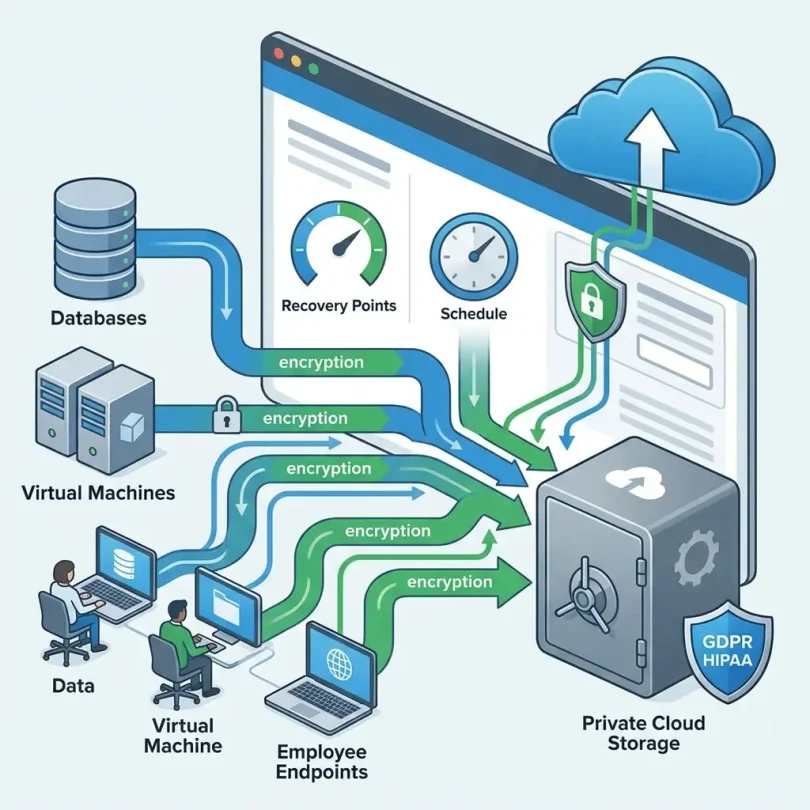
A cloud backup solution is software or a managed service that copies business data to secure cloud storage so it can be restored later if the original data is lost, deleted, corrupted, encrypted, or damaged.
Cloud backup can protect:
- Employee laptops
- Desktop computers
- File servers
- Databases
- Virtual machines
- Microsoft 365
- Google Workspace
- OneDrive
- SharePoint
- Teams
- Exchange email
- Gmail
- Google Drive
- SaaS apps
- Websites
- Application servers
- Cloud workloads
- NAS devices
- Business documents
- Photos, videos, and creative files
- Accounting files
- CRM exports
- Customer data
A business cloud backup platform may include:
- Automatic backup
- Scheduled backup
- Continuous backup
- Version history
- File restore
- Full device restore
- Server image backup
- Bare-metal recovery
- Ransomware recovery
- Immutable backup
- Encryption
- Admin dashboard
- Backup monitoring
- Retention policies
- Compliance reporting
- Disaster recovery
- Endpoint backup
- SaaS backup
- Remote wipe support
- Centralized user management
A good backup solution should make recovery easy. Backup is only useful if your business can actually restore data when needed.
Why Businesses Need Cloud Backup
Businesses need cloud backup because data loss can happen in many ways.
Common causes include:
- Ransomware
- Accidental deletion
- Employee mistake
- Laptop theft
- Hard drive failure
- Server crash
- Natural disaster
- Fire or flood
- Software corruption
- Failed update
- Insider threat
- Cloud account compromise
- SaaS data deletion
- Misconfigured sync
- Lost mobile device
- Human error
- Malware
- Vendor outage
Cloud backup helps businesses:
- Restore deleted files
- Recover after ransomware
- Protect remote employees
- Reduce downtime
- Meet compliance requirements
- Keep customer trust
- Avoid permanent data loss
- Support cyber insurance requirements
- Protect Microsoft 365 and Google Workspace
- Recover after hardware failure
- Support disaster recovery planning
Backups are not only for IT teams. They are business continuity tools.
If your company cannot access invoices, customer records, projects, or email history, operations can stop quickly.
Cloud Storage vs Cloud Backup
Many business owners confuse cloud storage with cloud backup.
They are not the same.
| Feature | Cloud Storage | Cloud Backup |
|---|---|---|
| Main purpose | File access and collaboration | Data protection and recovery |
| Examples | Google Drive, OneDrive, Dropbox | Acronis, Veeam, Backblaze, Druva |
| File sync | Yes | Sometimes |
| Version history | Limited or plan-based | Usually stronger |
| Full device recovery | Usually no | Often yes |
| Server backup | Usually no | Often yes |
| Ransomware recovery | Limited | Stronger |
| Admin backup monitoring | Limited | Yes |
| Retention policies | Limited | Stronger |
| Disaster recovery | No or limited | Yes, depending on plan |
Cloud storage helps teams work. Cloud backup helps teams recover.
A business may need both.
The 3-2-1 Backup Rule
The 3-2-1 backup rule is a simple backup strategy.
It means:
- Keep 3 copies of your data
- Store them on 2 different types of media or locations
- Keep 1 copy offsite
For modern businesses, this may look like:
- Original data on employee laptop or server
- Local backup on NAS or external storage
- Cloud backup in a secure backup provider
For ransomware protection, many companies now add immutable or offline backup copies. That means attackers cannot easily delete or encrypt the backup.
What Is Immutable Backup?
Immutable backup means backup data cannot be changed or deleted for a defined period.
This matters because ransomware attackers often try to delete or encrypt backups before demanding payment.
Immutable backup can help protect recovery points from:
- Ransomware
- Malicious deletion
- Compromised admin accounts
- Insider threats
- Accidental deletion
- Backup tampering
Veeam highlights immutable, secure cloud storage as part of its ransomware recovery and data resilience approach.
For business backup, immutability is now one of the most important features to consider.
Best Cloud Backup Solutions for Business Data
Below are some of the best cloud backup solutions for businesses in 2026.
1. Acronis Cyber Protect
Best for: Small businesses and MSP-managed backup plus cybersecurity
Good for: Endpoint backup, ransomware protection, disaster recovery, cyber protection
Main strength: Backup combined with cybersecurity and endpoint management
Acronis Cyber Protect is one of the strongest business backup platforms because it combines backup, disaster recovery, cybersecurity, anti-malware, endpoint management, and ransomware protection.
Acronis says Cyber Protect Cloud unites backup, disaster recovery, cybersecurity, and endpoint management in one integrated solution. Acronis Cyber Protect for Small Business also highlights ransomware protection and malware-free recovery to help small businesses get back online quickly after an attack.
Key Features
- Cloud backup
- Endpoint backup
- Server backup
- Ransomware protection
- Anti-malware protection
- Disaster recovery options
- Endpoint management
- File restore
- Full image backup
- Microsoft 365 backup options
- Cloud storage options
- Centralized console
- Backup monitoring
- Secure recovery
- MSP-friendly management
Why Acronis Is Good
Acronis is strong because it treats backup and cybersecurity as connected problems. This matters because many backup failures happen during cyberattacks.
A business that only backs up files but does not detect ransomware may restore infected or encrypted data. Acronis focuses on protection, detection, backup, and recovery together.
It is also popular with managed service providers, which makes it useful for small businesses that outsource IT.
Best Fit
Acronis Cyber Protect is best for small and mid-sized businesses that want backup, ransomware protection, endpoint security, and disaster recovery in one platform.
Possible Downsides
Acronis has many product editions and MSP options, so pricing and features can vary. Businesses should confirm exactly what is included: cloud storage, ransomware protection, Microsoft 365 backup, server backup, disaster recovery, and endpoint protection.
2. Veeam Data Platform
Best for: Enterprise backup, ransomware recovery, virtual machines, and hybrid cloud
Good for: VMware, Hyper-V, Microsoft 365, servers, enterprise workloads, hybrid cloud
Main strength: Enterprise-grade data resilience and recovery
Veeam is one of the most recognized names in enterprise backup and recovery. It is widely used for virtual machines, servers, cloud workloads, Microsoft 365, Kubernetes, and hybrid environments.
Veeam describes its ransomware recovery solution as helping organizations back up data and recover from cyber threats, with secure cloud storage and portability across hypervisors, clouds, and workloads. Veeam’s main site also positions its platform around data resilience, data portability, compliance, and AI-era data protection.
Key Features
- Enterprise backup
- Virtual machine backup
- Server backup
- Microsoft 365 backup
- Cloud workload backup
- Immutable backup support
- Ransomware recovery
- Disaster recovery
- Data portability
- Backup monitoring
- Compliance support
- Hybrid cloud backup
- Kubernetes backup options
- Recovery orchestration
- Enterprise reporting
Why Veeam Is Good
Veeam is strong for businesses that need serious backup and recovery across complex infrastructure. If your company runs virtual machines, on-prem servers, cloud workloads, Microsoft 365, and hybrid environments, Veeam is often a top platform to compare.
It is especially useful for IT teams that need flexible recovery options and strong control over backup storage.
Best Fit
Veeam Data Platform is best for mid-sized and enterprise businesses that need robust backup, ransomware recovery, and hybrid cloud data protection.
Possible Downsides
Veeam requires proper configuration and maintenance. Backup systems themselves can be targeted, so they must be patched and secured. Recent security reporting noted critical Veeam Backup & Replication vulnerabilities and urged users to update, showing why backup infrastructure needs the same security discipline as production systems.
3. Backblaze Business Backup
Best for: Simple unlimited endpoint backup
Good for: Small businesses, remote teams, laptops, desktops, creative teams
Main strength: Easy unlimited computer backup
Backblaze is known for simple, affordable cloud backup. Its business backup products are popular for endpoint backup because they are easy to deploy and manage.
Backblaze’s pricing page describes enterprise-grade, unlimited endpoint backup and provides pricing comparison for business and personal cloud backup providers.
Key Features
- Unlimited endpoint backup
- Laptop and desktop backup
- Automatic backup
- File restore
- Version history
- Admin management
- Business groups
- Remote computer backup
- External drive backup support depending on setup
- Simple deployment
- Web restore
- Courier recovery options in some regions
- Backblaze B2 cloud storage ecosystem
Why Backblaze Is Good
Backblaze is excellent for businesses that want simple backup for employee computers. It is especially useful for remote teams, agencies, designers, photographers, consultants, and small businesses with many laptops.
The big benefit is simplicity. Users do not need complex backup policies to start protecting files.
Best Fit
Backblaze Business Backup is best for small businesses and remote teams that need easy unlimited endpoint backup.
Possible Downsides
Backblaze Business Backup is not the same as full enterprise server backup or advanced disaster recovery. Companies with servers, databases, virtual machines, or complex recovery needs should compare Veeam, Acronis, Druva, Datto, and other enterprise options.
4. Druva Data Resiliency Cloud
Best for: SaaS backup, enterprise cloud backup, and data resilience
Good for: Microsoft 365, Google Workspace, Salesforce, endpoints, cloud workloads
Main strength: Cloud-native enterprise backup and SaaS data protection
Druva is a cloud-native data protection platform used by businesses that want backup and recovery across SaaS apps, endpoints, data centers, and cloud workloads.
Druva is often considered by companies that want cloud-first backup without managing backup infrastructure.
Key Features
- SaaS backup
- Microsoft 365 backup
- Google Workspace backup
- Salesforce backup
- Endpoint backup
- Cloud workload backup
- Data governance
- Ransomware recovery
- Legal hold options
- eDiscovery support
- Centralized management
- Cloud-native architecture
- Enterprise reporting
- Compliance support
Why Druva Is Good
Druva is strong for companies that rely heavily on SaaS apps and want cloud-native backup management. It reduces the need to manage backup servers, storage hardware, or complex backup infrastructure.
It is especially useful for organizations that need to protect Microsoft 365, Google Workspace, Salesforce, and distributed endpoints.
Best Fit
Druva is best for cloud-first businesses and enterprises needing SaaS backup, endpoint backup, and centralized cloud data protection.
Possible Downsides
Pricing may be higher than simpler SMB backup tools. Businesses should compare protected workloads, retention, storage, compliance features, and recovery options.
5. Datto Backup Solutions
Best for: MSP-managed backup and business continuity
Good for: Small businesses using managed IT providers, local + cloud recovery, disaster recovery
Main strength: Business continuity and disaster recovery through MSPs
Datto is widely used by managed service providers for small business backup and disaster recovery. It is known for business continuity appliances, cloud backup, and fast recovery options.
Key Features
- Business continuity and disaster recovery
- Local backup appliance options
- Cloud backup
- Server backup
- Image-based backup
- Ransomware recovery
- MSP management
- Rapid restore options
- Backup monitoring
- Disaster recovery testing
- Endpoint backup options depending on product
- Microsoft 365 backup options depending on product
Why Datto Is Good
Datto is useful for businesses that want backup handled by a managed IT provider. Many small businesses do not want to manage backup systems themselves. Datto gives MSPs tools to monitor backups, test recovery, and restore systems quickly.
It is especially good for businesses where downtime is expensive.
Best Fit
Datto is best for small and mid-sized businesses that work with an MSP and need business continuity, server backup, and disaster recovery.
Possible Downsides
Datto is often sold through MSPs, so pricing and service quality depend heavily on the provider. Businesses should ask about restore testing, response time, storage limits, and disaster recovery procedures.
6. Cove Data Protection
Best for: MSP-friendly cloud-first backup
Good for: Small businesses, MSP clients, servers, workstations, Microsoft 365
Main strength: Cloud-first backup with centralized MSP management
Cove Data Protection, from N-able, is a cloud-first backup solution often used by managed service providers. It protects servers, workstations, and Microsoft 365 data depending on plan and deployment.
Key Features
- Cloud-first backup
- Server backup
- Workstation backup
- Microsoft 365 backup
- Centralized management
- MSP dashboard
- Backup monitoring
- Recovery testing support
- Ransomware recovery support
- Efficient backup architecture
- Flexible recovery options
Why Cove Is Good
Cove is useful for MSP-managed small businesses that want cloud-first backup without heavy local infrastructure. It can protect different business workloads through a centralized platform.
Best Fit
Cove Data Protection is best for small and mid-sized businesses working with MSPs that need cloud-first backup for endpoints, servers, and Microsoft 365.
Possible Downsides
Like Datto, Cove experience depends on the MSP and plan. Businesses should confirm recovery time, storage, retention, and Microsoft 365 coverage.
7. IDrive Business
Best for: Affordable small business backup across multiple devices
Good for: SMBs, remote teams, NAS, servers, endpoints
Main strength: Cost-effective backup for many device types
IDrive is a popular cloud backup provider with business plans that support multiple computers, servers, mobile devices, and NAS backup options.
TechRadar’s 2026 cloud backup ranking named IDrive as the best overall cloud backup service, citing broad compatibility, strong data protection features, and affordability.
Key Features
- Multi-device backup
- Endpoint backup
- Server backup options
- NAS backup support
- Mobile backup
- Continuous backup
- File versioning
- Web restore
- Admin console
- Remote management
- Encryption
- Cloud storage
- Physical shipment restore options in some plans/regions
Why IDrive Is Good
IDrive is strong for small businesses that want one backup plan for multiple devices. It can be more flexible than single-computer backup tools.
It is especially useful for businesses with laptops, desktops, NAS devices, and smaller server needs.
Best Fit
IDrive Business is best for small businesses that need affordable backup across multiple devices and storage types.
Possible Downsides
Businesses with complex enterprise recovery needs may need stronger disaster recovery and server-focused tools.
8. CrashPlan for Small Business
Best for: Continuous backup and long retention needs
Good for: Small businesses, creative teams, legal offices, consultants
Main strength: Continuous endpoint backup and version history
CrashPlan is a cloud backup service known for continuous backup and business-friendly file retention. It is often considered by small businesses that need laptop and desktop backup.
TechRadar’s 2026 cloud backup guide listed CrashPlan as a strong choice for no-limit versioning and continuous backups.
Key Features
- Continuous backup
- Endpoint backup
- File versioning
- Long retention options
- Automatic backup
- Admin management
- User backup monitoring
- File restore
- Remote backup
- Cross-platform support
- Business-focused backup
Why CrashPlan Is Good
CrashPlan is useful for businesses that need continuous protection for employee files. It can be a good fit for teams where file changes happen all day and recovery from accidental deletion matters.
Best Fit
CrashPlan is best for small businesses that want continuous endpoint backup and longer file history.
Possible Downsides
CrashPlan is mainly endpoint-focused. Companies needing full server disaster recovery, SaaS backup, or complex infrastructure backup should compare enterprise tools.
9. Carbonite Business Backup
Best for: Small business backup with simple plans
Good for: Small offices, endpoints, servers depending on plan
Main strength: Recognized small business backup brand
Carbonite is a long-running cloud backup provider for consumers and businesses. It offers business backup products for small companies that need automatic data protection.
Key Features
- Cloud backup
- Endpoint backup
- Server backup options depending on plan
- Automatic backup
- File restore
- Admin management
- Encryption
- Remote backup
- Business support
- Simple deployment
Why Carbonite Is Good
Carbonite is useful for small businesses that want a recognizable backup provider and straightforward setup. It can be a practical choice for offices that need automatic backup without complex enterprise features.
Best Fit
Carbonite Business Backup is best for small businesses that want simple cloud backup for important files and devices.
Possible Downsides
Businesses should compare storage limits, retention, server backup features, ransomware recovery, and restore speed against Backblaze, IDrive, Acronis, and CrashPlan.
10. Rubrik Security Cloud
Best for: Enterprise cyber recovery and data resilience
Good for: Large companies, ransomware recovery, hybrid cloud, regulated industries
Main strength: Enterprise backup, cyber recovery, and data security posture
Rubrik Security Cloud is an enterprise data security and backup platform focused on cyber resilience, ransomware recovery, and data protection.
Rubrik is often considered by larger organizations that need backup, recovery, cloud data protection, data security posture, and cyber recovery workflows.
Key Features
- Enterprise backup
- Ransomware recovery
- Immutable backup
- Data security posture
- Cloud backup
- SaaS backup options
- Hybrid cloud protection
- Recovery orchestration
- Threat monitoring
- Data classification
- Compliance support
- Enterprise reporting
Why Rubrik Is Good
Rubrik is strong for companies where backup is part of a broader cyber resilience strategy. It is not only about copying files; it is about knowing what data exists, protecting it, detecting risk, and recovering after an attack.
Best Fit
Rubrik Security Cloud is best for larger companies and regulated organizations needing enterprise backup, ransomware recovery, and cyber resilience.
Possible Downsides
Rubrik may be too expensive and complex for small businesses. SMBs should compare Acronis, Backblaze, IDrive, Datto, Cove, and CrashPlan first.
Quick Comparison Table
| Cloud Backup Solution | Best For | Main Strength | Best Business Type |
|---|---|---|---|
| Acronis Cyber Protect | Backup + cybersecurity | Ransomware protection and recovery | SMBs/MSPs |
| Veeam Data Platform | Enterprise backup | Hybrid workload recovery | Mid-market/enterprise |
| Backblaze Business Backup | Endpoint backup | Simple unlimited computer backup | Small businesses/remote teams |
| Druva | SaaS and cloud backup | Cloud-native data resilience | Cloud-first businesses |
| Datto | MSP-managed BCDR | Business continuity | MSP-supported SMBs |
| Cove Data Protection | Cloud-first MSP backup | Server/workstation/M365 backup | MSP clients |
| IDrive Business | Affordable multi-device backup | Broad device support | Small businesses |
| CrashPlan | Continuous backup | Long version history | Creative/professional teams |
| Carbonite Business | Simple cloud backup | Easy small business backup | Small offices |
| Rubrik Security Cloud | Enterprise cyber recovery | Data resilience and ransomware recovery | Large enterprises |
Best Cloud Backup Solution by Business Type
Best for Small Businesses
Acronis, Backblaze, IDrive, Carbonite
These are practical for small companies that need endpoint backup, simple management, and file restore.
Best for Remote Teams
Backblaze, Acronis, CrashPlan, IDrive
Remote teams need automatic backup for employee laptops and desktops.
Best for MSP-Managed Businesses
Acronis, Datto, Cove
These tools work well through managed service providers.
Best for Enterprise Backup
Veeam, Rubrik, Druva
These are better for complex infrastructure, SaaS backup, hybrid cloud, and ransomware recovery.
Best for Microsoft 365 Backup
Veeam, Acronis, Druva, Cove
Microsoft 365 data still needs backup if your business needs long retention, recovery, compliance, or protection from accidental deletion.
Best for Ransomware Recovery
Veeam, Acronis, Rubrik, Datto
Look for immutable backup, clean recovery, recovery testing, and strong admin controls.
Best for Creative Teams
Backblaze, CrashPlan, IDrive
Creative teams often need large storage and simple file recovery.
Key Features to Look for in Cloud Backup Solutions
1. Automatic Backup
Backups should run automatically. Manual backup is unreliable.
2. Version History
Version history lets you restore earlier versions of files before deletion, corruption, or ransomware encryption.
3. Ransomware Recovery
Look for:
- Immutable backups
- Malware scanning
- Clean recovery
- Backup anomaly detection
- Fast rollback
- Restore testing
- Admin alerts
4. Microsoft 365 and Google Workspace Backup
Many businesses assume Microsoft and Google fully back up everything for long-term recovery. Businesses still need their own backup if they require retention, point-in-time restore, user-level recovery, or protection from accidental deletion.
5. Endpoint Backup
Remote laptops should be backed up automatically.
6. Server Backup
If you run file servers, databases, virtual machines, or application servers, endpoint backup is not enough.
7. Fast Restore
Backup is only useful if restore works.
Check:
- File restore speed
- Full device restore
- Physical shipment restore
- Bare-metal recovery
- Cloud recovery
- Disaster recovery options
8. Encryption
Look for encryption in transit and at rest. Some businesses may need private key encryption.
9. Admin Dashboard
Businesses need visibility into:
- Backup status
- Failed backups
- Protected devices
- Storage usage
- Restore points
- User activity
- Alerts
- Retention policies
10. Compliance Support
Regulated businesses may need:
- Audit logs
- Retention policies
- Legal hold
- Data residency
- Access controls
- Encryption reports
- Compliance documentation
Cloud Backup Pricing: What Businesses Should Expect
Cloud backup pricing depends on:
- Number of users
- Number of devices
- Storage amount
- Servers protected
- Microsoft 365 or Google Workspace users
- Retention period
- Backup frequency
- Disaster recovery features
- Immutable storage
- Compliance features
- Support level
- Managed service provider pricing
- Monthly vs annual contract
Backblaze highlights unlimited endpoint backup on its business backup pricing page. IDrive is often attractive for businesses that need affordable multi-device backup, while enterprise platforms such as Veeam, Rubrik, Druva, and Acronis can cost more depending on protected workloads and recovery features.
Do not compare only monthly price. Compare restore speed, retention, security, ransomware recovery, and admin controls.
Cloud Backup Implementation Checklist
Use this checklist before choosing and deploying a backup solution.
Step 1: Identify Critical Data
List your most important data:
- Customer records
- Finance files
- Contracts
- CRM data
- Website files
- Databases
- Project files
- Source code
- Employee documents
Step 2: Choose Recovery Goals
Define:
- RPO: How much data can you afford to lose?
- RTO: How fast must you recover?
Step 3: Choose What to Back Up
Include:
- Laptops
- Desktops
- Servers
- Microsoft 365
- Google Workspace
- NAS
- Cloud workloads
- Websites
- Databases
Step 4: Set Retention Policies
Decide how long to keep backups.
Examples:
- 30 days
- 90 days
- 1 year
- 7 years for compliance
- Custom legal retention
Step 5: Add Immutable Backup
Use immutability where ransomware risk is serious.
Step 6: Encrypt Backup Data
Use strong encryption and access controls.
Step 7: Monitor Backup Jobs
Failed backups should create alerts.
Step 8: Test Restores
Do not wait for a disaster to learn restore does not work.
Step 9: Document Recovery Process
Create a written disaster recovery plan.
Step 10: Review Quarterly
Review backup coverage, restore tests, storage cost, and retention needs.
Common Cloud Backup Mistakes Businesses Make
Mistake 1: Thinking Sync Is Backup
OneDrive, Google Drive, and Dropbox sync are not always enough.
Mistake 2: Not Backing Up Microsoft 365
Email, Teams, SharePoint, and OneDrive data may need separate backup.
Mistake 3: No Restore Testing
A backup that cannot restore is useless.
Mistake 4: No Immutable Backup
Ransomware can target backup systems.
Mistake 5: Backing Up Only Some Devices
Remote laptops often contain important files.
Mistake 6: No Admin Alerts
Failed backups can go unnoticed for months.
Mistake 7: Weak Backup Account Security
Backup admin accounts need MFA and strict access control.
Mistake 8: Not Defining RPO and RTO
Businesses need to know how much data loss and downtime they can tolerate.
Mistake 9: Not Protecting Backup Infrastructure
Backup servers and consoles must be patched and secured.
Mistake 10: No Disaster Recovery Plan
Backup is part of recovery, not the whole plan.
Cloud Backup Security Best Practices
Follow these rules:
- Use MFA for backup admin accounts
- Limit admin access
- Use immutable backup storage
- Use encryption
- Monitor failed backups
- Test restores regularly
- Keep backup software patched
- Separate backup credentials from normal admin accounts
- Keep at least one offsite backup
- Use least privilege access
- Document recovery steps
- Protect backup consoles from public internet exposure
- Review backup logs
- Store recovery keys safely
- Include backup in incident response planning
Backup systems are high-value targets. Treat them like critical security infrastructure.
Final Verdict: What Is the Best Cloud Backup Solution for Business Data?
The best cloud backup solution depends on your business size, data type, budget, and recovery goals.
For most businesses:
- Best backup + cybersecurity: Acronis Cyber Protect
- Best enterprise backup platform: Veeam Data Platform
- Best simple endpoint backup: Backblaze Business Backup
- Best cloud-native SaaS backup: Druva
- Best MSP-managed disaster recovery: Datto
- Best MSP cloud-first backup: Cove Data Protection
- Best affordable multi-device backup: IDrive Business
- Best continuous endpoint backup: CrashPlan
- Best simple small business backup: Carbonite Business
- Best enterprise cyber recovery: Rubrik Security Cloud
If you are a small business, start by comparing Acronis, Backblaze, IDrive, Carbonite, and CrashPlan. If you work with an MSP, compare Acronis, Datto, and Cove. If you are a larger company with servers, cloud workloads, Microsoft 365, and ransomware recovery requirements, compare Veeam, Druva, Rubrik, and Acronis.
The right backup solution should protect your data, detect backup failures, support fast restore, reduce ransomware impact, and help your business keep running after a disaster.
Backup is not just an IT task. It is business survival planning.
FAQs About Cloud Backup Solutions for Business
What is the best cloud backup solution for business?
The best option depends on your needs. Acronis is strong for backup plus cybersecurity, Veeam is strong for enterprise recovery, Backblaze is strong for simple endpoint backup, Druva is strong for SaaS backup, and Datto is strong for MSP-managed disaster recovery.
What is cloud backup?
Cloud backup is a service that copies business data to secure cloud storage so it can be restored after deletion, ransomware, hardware failure, corruption, or disaster.
Is cloud storage the same as cloud backup?
No. Cloud storage is mainly for file access and collaboration. Cloud backup is designed for recovery, retention, versioning, and disaster protection.
Do businesses need Microsoft 365 backup?
Many businesses do. Microsoft 365 provides cloud services, but businesses may still need separate backup for long retention, accidental deletion recovery, ransomware recovery, compliance, and point-in-time restore.
Is Backblaze good for business backup?
Backblaze is a strong option for simple endpoint backup. Its pricing page highlights enterprise-grade, unlimited endpoint backup.
Is Acronis good for small businesses?
Yes. Acronis Cyber Protect for Small Business highlights ransomware protection and malware-free recovery to help businesses get back online quickly.
Is Veeam good for ransomware recovery?
Yes. Veeam positions its ransomware backup and recovery solution around data resilience, secure cloud storage, portability, and recovery from cyber threats.
What is immutable backup?
Immutable backup is backup data that cannot be changed or deleted for a set period. It helps protect backups from ransomware, insider threats, and accidental deletion.
How often should a business back up data?
It depends on how much data loss the business can tolerate. Critical systems may need continuous or frequent backup, while less critical files may be backed up daily.
Should small businesses test backups?
Yes. Every business should test restores regularly. A backup is only useful if the data can be recovered successfully.